Comment

Venue hire

We do hire out our venues both to members of our church family as well as members of the public. We ask that all queries go to admin@hunterbiblechurch.org

Here are some principles that we want to hold on to as we hire out our venues:

  • We want to maintain spaces that are useful for ministry, and gospel ministry is our first priority

  • We want our church family to be able to celebrate their life events in church spaces, because it’s their space but also because it’s a great opportunity to invite friends and family to come to church

  • We want people from outside church to have a really great experience of dealing with us

The process:

  1. Check the master calendar and the venue bookings calendar for availability

  2. Send through associated costs and hire conditions (linked below)

  3. If they wish to proceed with hiring the venue, get them to fill out the venue hire form to finalise their booking (linked on the venue hire costs docs)
    HBC member fees for private event (e.g., birthday party)
    HBC member fees for weddings and other Christian events
    HBC member fees for funerals
    Non-member hire fees
    HBC members wanting a wet weather option for their events (read this before proceeding with booking; slightly different procedures apply!)

  4. Place booking in the venue bookings calendar

  5. Calculate their hire fee and confirm with hirer. Email finance@hunterbiblechurch.org so they can invoice the hirer.
    Note: If they’re wanting to book a wedding on a small budget and need to lower the price, we LOVE being able to do this for them. Get them in touch with your admin team leader.

  6. Talk to Debbie about booking any extra cleaning services

  7. Contact hirer to see if they need an orientation to how to unlock and lock up the venue; organise one if required

  8. After event, contact finance@hunterbiblechurch.org to process the return of their bond

Other notes:

  • If someone external to church is wanting to hire the venues, just double check with your admin team leader (Jocelle/Debbie/Dave)… there might be some extra things to consider

  • There’s some extra administrative steps to do with processing wedding documents if you’re booking a wedding! More of that in a separate blog post.

Comment

Comment

HBC City Emergency Evacuation Plan

Tabled to the HBC Safe Ministry Committee: August 2025


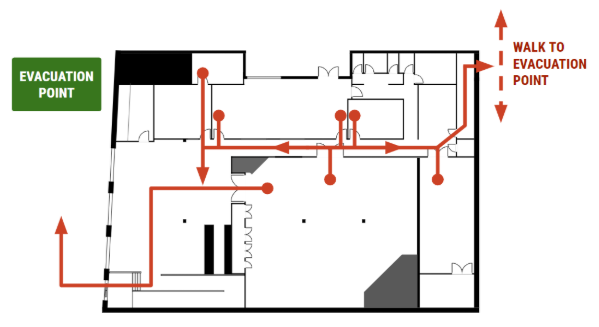
Site Map


Evacuation Equipment

The evacuation equipment shall be stored in the kitchen 


Alarm

When an emergency alarm sounds, the priority shall be to

  1. Evacuate all people to the Evacuation Point

  2. Conduct a sweep to check that no people are left inside, if safe to do so.

The following personnel will be responsible for the following activities.


Evacuation Roles and Responsibilities

Chief Warden

Oversees and controls whole site response

The Chief Warden shall

  1. Take charge of Site and announce to attendees:

“The fire alarm has sounded. We are going to evacuate through the nearest fire exit and meet at the Emergency Evacuation Point on King Street. 

(if there is a Kids Program running…)

The kids team will be evacuating your children and they will meet you at the Emergency Evacuation point”

  1. Identify/appoint Fire Warden 1 (Foyer and Auditorium), and Fire Warden 2 (if there is a Kids Program running)

  2. Ensure the Fire Wardens are aware of their responsibilities

  3. Wear the white hat and vest and megaphone

  4. Take lead at the Emergency Evacuation Point 

  5. Communicate to parents The kids team is conducting a roll call and we will let you know when you can collect your children”

  6. Communicate to attendees to remain at the Emergency Evacuation Point, clear of the building entrance, until emergency services arrive in order to keep the building entrance clear of pedestrian traffic and minimise vehicle traffic on King St.

  7. Liaise with Fire Wardens once the site is cleared, and delegate to appropriate persons to conduct a search for any missing persons if it is safe to do so.

  8. Communicate with Emergency services when they arrive.

  9. If the fire alarm is likely to be a false alarm or minor issue (e.g. burnt toast) then encourage people to stay at the Emergency Evacuation Point so that people can re-enter the building when the all-clear has been given. If however fire/smoke is evident and it is highly unlikely that re-occupation of the building is to occur in the near future, people should be allowed to disperse provided this will not impede Emergency services personnel or vehicles. 

  10. Communicate with all people on site that they may return to site once the all clear is given. 


Fire Warden 1: Foyer + Auditorium

Core Responsibility: Oversee evacuation and then do a site sweep of their area

Fire Warden 1 shall

  1. Wear the fire warden vest and hat, stored in the kitchen.

  2. Determine the best Auditorium exit points. 

  3. Instruct people to use those exits to move to the Emergency Evacuation Point directly and not collect children. e.g. “The kids team is taking your children to the Emergency Evacuation Point”

  4. Conduct a sweep to check there are no persons in the Auditorium, Kitchen, Kids areas, store rooms and bathrooms (if safe to do so). If there is no kids program and no Fire Warden 2, conduct a sweep of all rooms. 

  5. Report back to the Chief Warden that the area has been cleared and await further instruction.


Fire Warden 2: Kids Areas 

Core Responsibility: Oversee evacuation and then do a site sweep of their area.

Fire Warden 2 shall:

  1. Wear the fire warden vest and hat, stored in the Kitchen

  2. Oversee the evacuation of all the Kids areas 

  3. Ensure all personnel have been evacuated from the Kids areas.

  4. They shall notify all Kids Team leaders to 

    1. Evacuate all children to the Emergency Evacuation Point

    2. Bring rolls of children attending

    3. Conduct a roll call at the Emergency Evacuation Point

    4. Coordinate orderly collection of kids by parents

  5. They shall liaise with the Team Leaders and report any missing children to the Chief Warden


Sunday Church

The Chief Warden shall be the City Campus Director, or (if not on site) the most senior member of staff, or their delegate.

Fire Warden 1 shall be the Service Area Leader (or their delegate)

Fire Warden 2 shall be the Kids Area Leader (or their delegate)


Women’s Growth Group

The Chief Warden shall be the Day Leader of Women’s Growth Group, or (if not on site) the most senior member of staff, or their delegate.

Fire Warden 1 shall be a Women’s Growth Group Leader appointed by the Chief Warden.

Fire Warden 2 shall be the Little Buds Team Leader (or their delegate)


General Events 

The Chief Warden shall be the most senior member of staff, or their delegate.

Fire Warden 1 shall be appointed by the Chief Warden.

Fire Warden 2 shall be appointed by the Chief Warden.

Comment

Comment

HBC Garden Suburb Emergency Evacuation Plan

Tabled to the HBC Safe Ministry Committee: August 2025

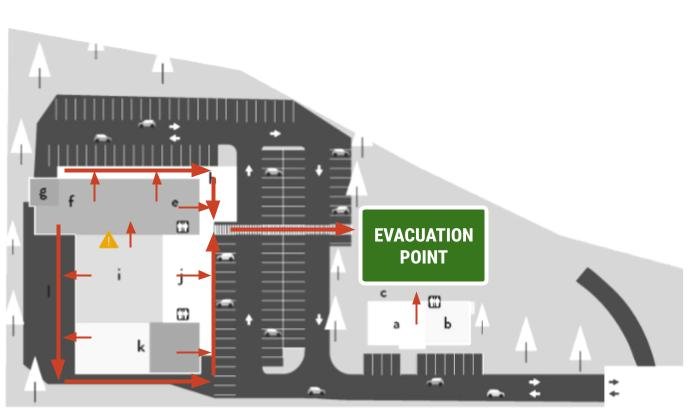
Site Map


Evacuation Equipment 

The evacuation equipment for the Main Complex shall be stored behind the curtain on the North side of the Auditorium.


Alarm Response

When an emergency alarm sounds, the priority shall be to 

  1. Evacuate all people to the Evacuation Point.

  2. Conduct a sweep to check that no people are left inside, if safe to do so.

The following personnel will be responsible for the following activities.


Evacuation Roles and Responsibilities

Chief Warden: Responsible for whole site response

The Chief Warden shall:

  1. Take charge of Main Complex site and announce to attendees:

    • “The fire alarm has sounded. We are going to evacuate through the nearest fire exit and meet at the Emergency Evacuation Point on the grass outside. Please do not leave the site - we need to keep the driveway clear for emergency services.

      (if there is a Kids Program running…) The kids team will be evacuating your children and they will meet you at the Emergency Evacuation point”

  2. Identify/appoint Fire Warden 1 (for general site), and Fire Warden 2 (if there is a Kids Program running)

  3. Ensure the Fire Wardens are aware of their responsibilities

  4. Wear the white hat and vest and obtain the megaphone

  5. Take lead at the Emergency Evacuation Point 

  6. Communicate to attendees to remain on-site until emergency services arrive in order to keep the entrance to GS clear from traffic.

  7. Communicate to parents The kids team is conducting a roll call and we will let you know when you can collect your children”

  8. Liaise with Fire Wardens once the site is cleared, and delegate to appropriate persons to conduct a search for any missing persons if it is safe to do so.

  9. Communicate with Emergency services when they arrive.

  10. Communicate with all people on site that they may return to site or leave, once Emergency Services have given an all-clear (or other reasonable instruction).


Fire Warden 1: Foyer + Auditorium

Core Responsibility: Oversee Evacuation and then do a site sweep of their area

Fire Warden 1 shall

  1. Wear the fire warden vest and hat, stored in the Auditorium.

  2. Determine the best Auditorium and Foyer exit points. 

  3. Direct people to use those exits to move to the evacuation point directly and not collect children. e.g. “The kids team is taking your children to the Emergency Evacuation Point”

  4. Conduct a sweep to check there are no persons in the Auditorium, Kitchen and Foyer bathrooms (if safe to do so). If there is no kids program and no Fire Warden 2, conduct a sweep of all rooms and spaces.  

  5. Report back to the Chief Warden that the area has been cleared and await further instruction.


Fire Warden 2: Kids Areas (lounge, hall, playground, GS house)

Core Responsibility: Oversee Evacuation and then do a Site sweep of their Area.

Fire Warden 2 shall:

  1. Wear the fire warden vest and hat, stored in the Hall

  2. Oversee the evacuation of all the Kids areas 

  3. Ensure all personnel have been evacuated from the Kids areas and Hall toilets

  4. They shall notify all Kids Team leaders to 

    1. Evacuate all children to the Emergency Evacuation Point

    2. Bring rolls of children attending

    3. Conduct a roll call at the Emergency Evacuation Point

    4. Coordinate orderly collection of kids by parents

  5. They shall liaise with the Team Leaders and report any missing children to the Chief Warden


Sunday Church

The Chief Warden shall be the Garden Suburb Campus Director, or (if not on site) the most senior member of staff, or their delegate.

Fire Warden 1 shall be the Service Area Leader (or their delegate).

Fire Warden 2 shall be the Kids Area Leader (or their delegate).


Women’s Growth Group

The Chief Warden shall be the Day Leader of Women’s Growth Group, or (if not on site) the most senior member of staff, or their delegate.

Fire Warden 1 shall be a Women’s Growth Group Leader appointed by the Chief Warden (or their delegate).

Fire Warden 2 shall be the Kids Team Leader (or their delegate).


Friday Youth

The Chief Warden shall be the Youth Pastor, or (if not on site) the most senior member of staff, or their delegate.

Fire Warden 1 shall be Senior Youth Section Leader (or their delegate).

Fire Warden 2 shall be the Junior Youth Section Leader (or their delegate).

Special Friday Youth Actions

Chief Warden shall:

  1. Direct Youth Leaders to conduct a roll call using the Elvanto Check-In system

  2. Direct a Staff member (or their delegate) to contact parents via Elvanto:

    1. Go to Reports.

    2. Select Check-in from the View drop down.

    3. Select the Overall Check-In Attendance report.

    4. Change the date range to just today's date.

    5. Click Generate.

    6. Click the mail button in the top right of the screen.

    7. Select SMS Only.

    8. Advise parents of the evacuation. Confirm all youth are accounted for. Communicate appropriate pick up time (default to regular end of youth time) after the arrival of emergency services in order to keep the GS entryway clear of traffic.
      Suggested SMS template:
      Hi parents — just letting you know the fire alarm has been triggered at the HBC Garden Suburb site. All youth have been safely evacuated and are accounted for. Emergency services are on their way, so we ask that you wait until after [TIME] to come for pickup to help keep the driveway clear.
      Thanks for your understanding and support!


General Events (Main Complex)

The Chief Warden shall be the most senior member of staff, or their delegate.

Fire Warden 1 shall be appointed by the Chief Warden.

Fire Warden 2 shall be appointed by the Chief Warden.


GS Office

If there is a Smoke Alarm or Emergency in the Site Office, the Chief Fire Warden shall be the most senior member of staff, or their delegate.

They shall have similar responsibilities as the Chief Fire Warden on the Main Site, applied as best suited to the GS Office.

Special Actions

Chief Warden shall:

  1. Alert all personnel in the Building; Office, the Garden Cottage, Downstairs Classroom and Toilets

  2. Conduct a sweep of these areas if safe to do so.

  3. Contact emergency services and act as the liaison.

Comment

Comment

Event Registration

Event Registration

  • Use link in email informing admin of a new form submission to navigate to the form

  • Check registration information

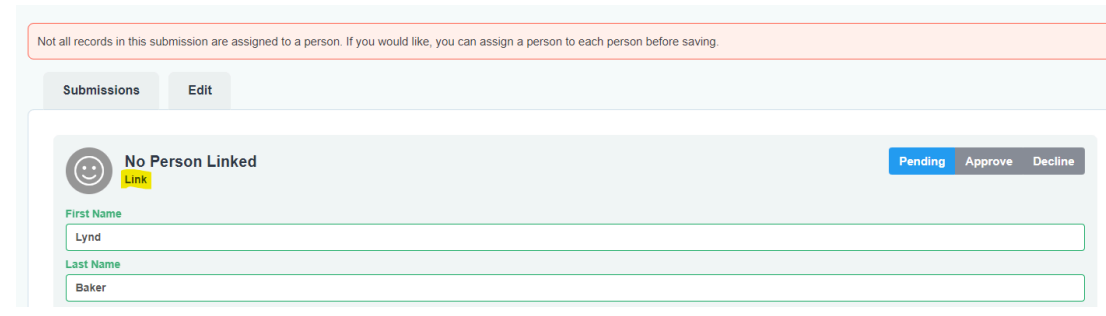
    • WHEN NOT LINKED TO AN ELVANTO PROFILE (some of the time)

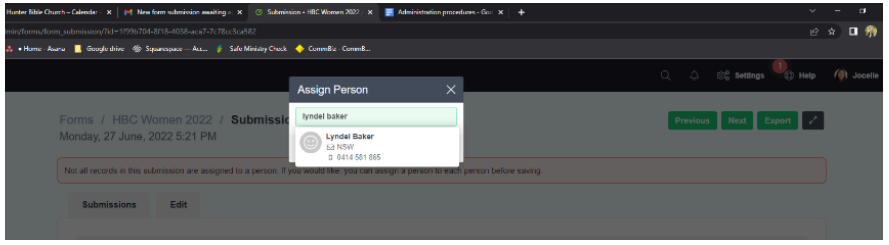
  • Hit “link” and search for their name. If they’re in the database, you can then click on their Elvanto profile to link the submission to someone in Elvanto. Then proceed as per someone already linked to an Elvanto profile.

  • If the submission does not have a profile already in Elvanto, you’ll need to create a new person and link the new person.

  • WHEN LINKED TO AN ELVANTO PROFILE (most of the time - you’ll see someone’s name in green at the top of the form submission)

    • Check details (any discrepancies will be highlighted in orange)

  • Leave form submission if you believe that details need to be updated. Otherwise copy details that are in Elvanto already and paste into form field (e.g., maiden name “Hope” updated to married name “Vanderhout”)

  • Hit “Approve”

  • Navigate back to submissions

    • Repeat for any remaining registrants

  • Archive form submission email in admin inbox

Comment

Comment

Elvanto Rosters

Elvanto Rosters

  • Services > edit multiple > specify time frame + congregation

  • Adding volunteers

    • Find correct ministry position (e.g., “production team member”)

    • Click the + button 

    • Clear all the search filters

    • Search for the volunteer you want rostered

    • Drag them to the correct slot

  • Deleting volunteers

    • Press the red bin icon next to their name > remove

Comment

Comment

How People Get Elvanto Access

How People Get Elvanto Access

Access to Elvanto is managed through Elvanto Department Positions, A Google Spreadsheet and a HBC App script that keeps access in sync with people in various positions.

  1. Give them a Department Position

    • Add a Department Position to the person. That Department Position should have a corresponding Access Level in the ‘Elvanto Departments and Access Syncing’ spreadsheet.

  2. HBCApp will auto-update their Elvanto Access Level

    • Every 30 mins (or so) a script will run on the HBCApp.com site that will update Elvanto People and make sure they have the Elvanto Access prescribed by the Dept Position with the highest level of access. E.g. If Sam is a Barista who needs 1-Roster Access, and also a Area Leader who needs 3-Edit Access, he will get 3-Edit Access.

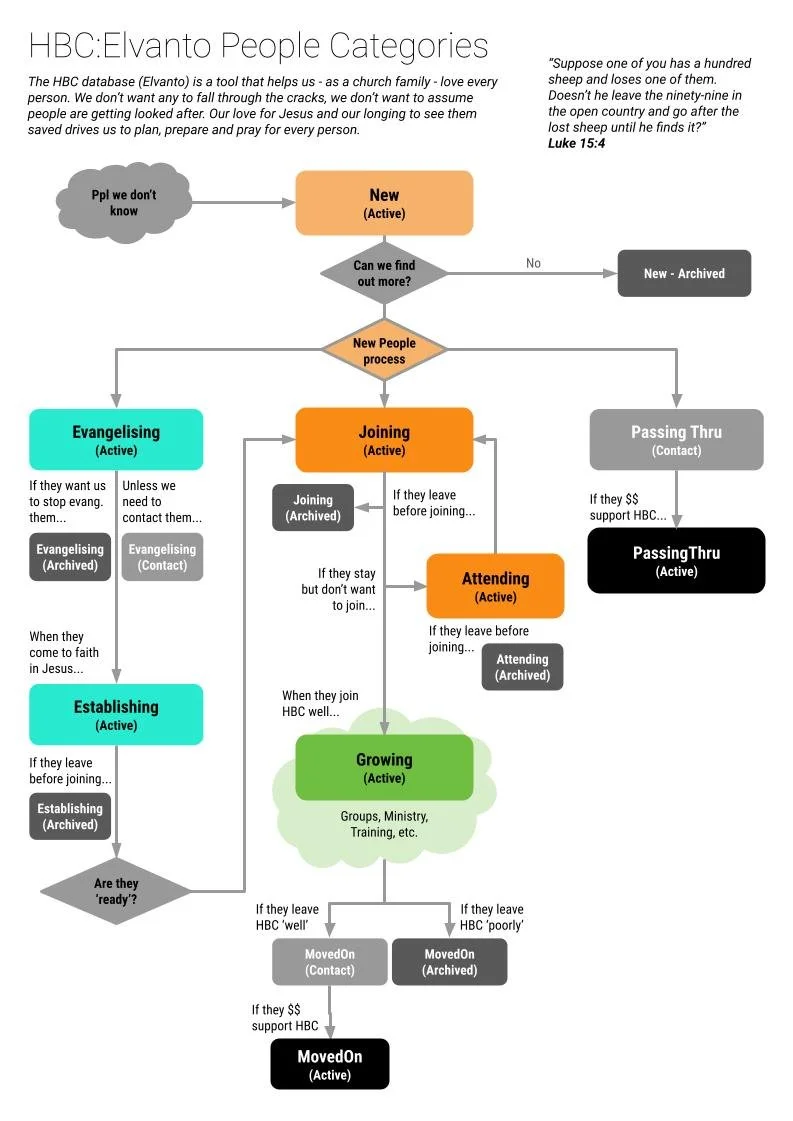
    • This will also remove people’s access level if they are no longer in a Dept or if they change their people category. Only people in Joining, Attending and Growing can have Elvanto Access.

  3. People with 1-Roster access can create their own login

    • If people get assigned 1-Roster Access, we don’t ask them to sign an access agreement, nor do we send them a login link.

    • Instead, they might receive a Roster Reminder email (e.g. to serve on a Sunday). That email invites them to login and see when they are serving in the future, and to do that, they'll need to go through the ‘forgot password’ process and create a login.

  4. HBCApp will update people in the ‘Needs to Sign Database Agreement’ Group

    • If someone needs Access above 1-Roster, and they have NOT yet signed the Database access Agreement, the HBCApp will automatically add them to the ‘People who need to sign the Database Access Agreement’ Elvanto Group.

    • People who no longer need access will be removed from the group.

Admin Jobs Regarding Elvanto Access

  1. Monthly email asking people to sign database access agreement

  2. Monthly email asking people to re-sign the database access agreement after 3 years

  3. Review Submissions to HBC Database Access Agreement

    • When people sign the Database Access Agreement, they will appear in the Submissions tab. These submissions will need to be reviewed and cleared.

      • Please ensure the “Date Access Policy Read” matched the date they signed the form.

Comment